
SumiTable
Copy web tables as Markdown, Excel-ready TSV or CSV.
Copy tables without the mess
SumiTable is a browser extension that copies any table on a web page as Markdown, Excel-ready TSV or CSV.
Paste into AI chats and notes as a real table, or into Excel and spreadsheets with every value in its own cell.
Merged cells, multi-row headers and footnote marks like [1] are cleaned up before you paste.
Free features
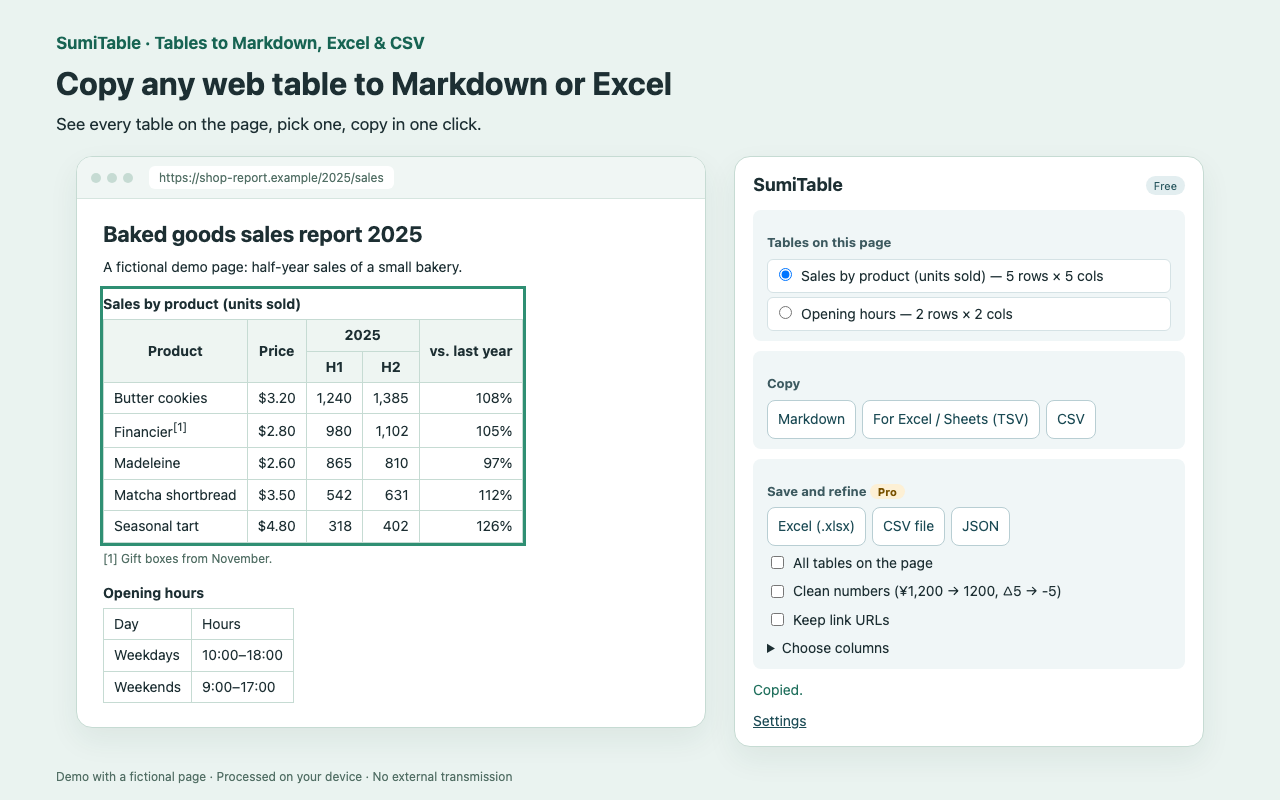
- List the tables on the page with their title and size; the picked table is outlined on the page
- Copy the table as Markdown, TSV for Excel/spreadsheets, or CSV (up to 200 rows per table)
- Select text inside a table and right-click to copy that table
- Merged cells, two- and three-row headers, footnote marks and empty rows or columns are tidied up
- Notes such as "(Unit: thousand yen)" above or below a table are kept apart from the headers
- English and Japanese interface
Pro (coming soon, not on sale)
No row limit; save as Excel (.xlsx), CSV file or JSON; export every table on the page at once; choose columns; clean up numbers (full-width digits, "¥1,200", "△500" and more); keep link URLs. Pro is not on sale yet; everything under "Free features" works now.
How to use
- On a page with a table, click SumiTable in the toolbar.
- Pick a table from the list, then click Markdown, For Excel / Sheets (TSV) or CSV.
- Paste it into an AI chat, a note, Excel or a spreadsheet.
Some pages cannot be read, such as browser settings pages and extension stores. Tables drawn as images, rows that load as you scroll, and tables split across several pages are not supported. Use only content you are allowed to view and use.
Privacy
Tables are read from the current page only when you click the button or use the right-click menu. Everything is processed on your device; page content and settings are never sent anywhere. The extension itself has no network communication, analytics, advertising or account (this website's page-view counting is described in the privacy policy). See the privacy policy for details.
Microsoft Edge Add-ons: Coming soon
Firefox Add-ons: Coming soon
Chrome Web Store: Coming soon
Guides
How to convert an HTML table to MarkdownNumbers copied from a website won't add up in ExcelCSV shows garbled characters in ExcelWhole pages as Markdown: SumiClip